
Most companies fail at onboarding. Gallup says only 12% of staff think their employer does it well. Poor new hire paperwork costs you money. You lose $14,000 when someone leaves early.
High quality onboarding forms change that. They keep you legal. Use the right employee onboarding documents to boost retention. This guide to digital onboarding covers everything from the offer letter to the 7 best onboarding forms to use in 2026. You will set your team up for success.
The 7 Best Onboarding Forms to Set New Hires Up for Success
Smart HR managers use specific onboarding forms to stay legal and keep things moving. You need these employee onboarding documents to build a solid foundation for your team.
These 2026 standards for new hire paperwork ensure your company stays compliant while making life easier for your staff. Here are the 7 best onboarding forms to use right now.
Form 1: Form I-9 (Employment Eligibility Verification)
Every new hire must complete the Form I-9. This federal requirement proves identity and work authorization. You have exactly three business days from the start date to finish it.
In 2026, many teams will use digital onboarding to handle this. If you use E-Verify, you can often review documents remotely.
Keep these rules in mind:
You must review original documents, not photocopies.
Never accept expired IDs or passports.
Store these employee onboarding documents for three years after the hire date.
Keep them for at least one year after the person leaves the company.
Missing a signature or a date on this form leads to heavy fines during an ICE audit. Complete this early to avoid stress.
Form 2: Form W-4 (Employee's Withholding Certificate)
Form W-4 tells you how much federal tax to withhold from pay. It is a staple among your onboarding forms. Since the IRS updated the layout, the form no longer uses allowances.
Send this with the offer letter so you have it before the first check. Reliable onboarding forms keep your books clean. Use onboarding forms to ensure tax accuracy.
Review any "Exempt" claims with your tax team.
Update this if the employee has major life changes.
Integrate this into your digital onboarding flow.
Incomplete new hire paperwork leads to tax penalties. These employee onboarding documents help you stay organized and compliant.
Form 3: State New Hire Reporting Form
Federal law requires you to report every new employee to your state agency. These onboarding forms help agencies track child support and unemployment. You must submit these onboarding forms within 20 days to stay fully compliant.
Report to the state where the employee works, even if your main office is elsewhere.
Automate state new hire reporting through your digital onboarding software to save time.
Gather specific details through your new hire paperwork like social security numbers and start dates.
Save copies in your employee onboarding documents folder to pass any future state audits.
Reliable onboarding forms keep your reporting process fast and accurate.
Form 4: Direct Deposit Authorization Form
Getting paid correctly is the top priority for every new employee. A direct deposit authorization ensures funds land in the right bank account without any delay.
These onboarding forms reduce manual payroll errors and eliminate the need for paper checks.
Ask for a voided check or bank letter to verify routing and account numbers.
Use digital onboarding to let employees enter details directly into your payroll system.
Confirm the setup before the first pay cycle to prevent any missed payments.
Store employee onboarding documents securely to protect sensitive financial data.
Reliable onboarding forms show you value timely pay. This specific piece of new hire paperwork builds trust from day one.
Form 5: Benefits Enrollment Form
Most new hires want health and retirement options immediately. These onboarding forms allow staff to pick medical, dental, and vision plans. A benefits enrollment form ensures long-term security.
Completing this new hire paperwork quickly means coverage starts without a stressful gap.
Include a plan comparison summary with your onboarding forms to simplify complex choices.
Set a firm 30-day deadline for these employee onboarding documents to prevent missed enrollment windows.
Use digital onboarding portals to automate selection and reduce manual HR data entry.
Verify that your onboarding forms capture mandatory state-specific leave elections for 2026.
Accurate onboarding forms help your team feel protected. High-quality new hire paperwork is a major factor in long-term employee satisfaction and overall productivity.
Form 6: Non-Disclosure Agreement (NDA)
Protect your business secrets with a clear non-disclosure agreement. These onboarding forms ensure your trade secrets and client data stay private.
It is an essential part of your new hire paperwork that legally guards your intellectual property from day one.
Update your templates to remove illegal non-compete clauses in states like California or Minnesota.
Use digital onboarding to collect signatures securely and verify identity through a timestamped audit trail.
Store these employee onboarding documents in a secure digital folder to stay organized and audit-ready.
Clear onboarding forms keep your sensitive data safe while respecting new state labor laws.
Form 7: Employee Handbook Acknowledgment Form
An employee handbook acknowledgment proves your staff read the company rules. It turns your policies into a clear agreement.
Include this in your onboarding forms to cover topics like safety and conduct. This piece of new hire paperwork protects you during legal disputes.
Update your employee onboarding documents annually to include new AI and remote work policies.
Use digital onboarding to track who signed the acknowledgment and who still needs a reminder.
Link the handbook to your offer letter so new hires can review it before their first day.
Comprehensive onboarding forms create a professional culture where everyone knows the expectations from the start.
The 7 Best Onboarding Forms for Success At a Glance:
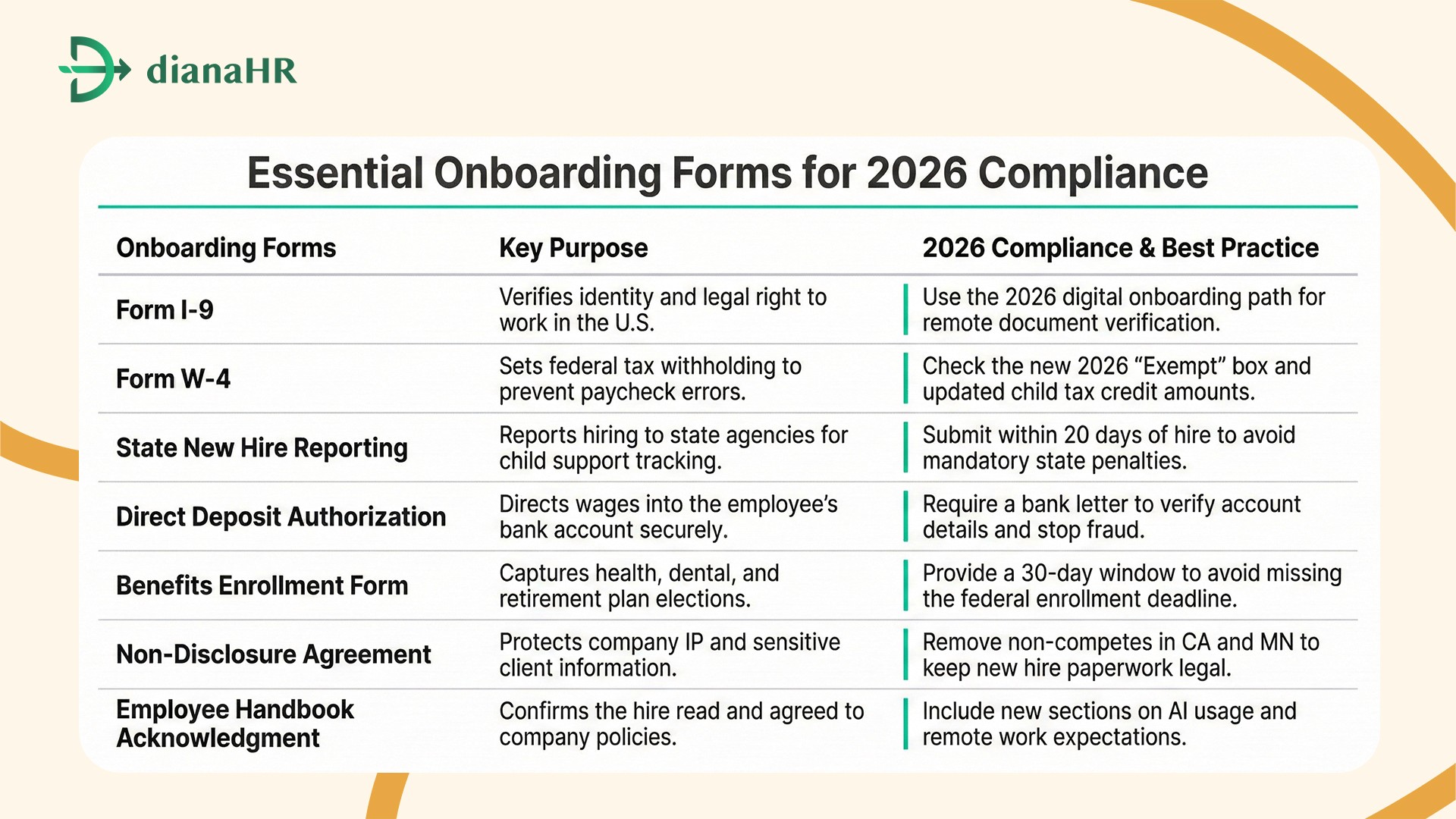
What Separates a Strong Employee Onboarding Documents Package From a Weak One
Strong onboarding forms build trust through clarity. Efficient onboarding forms make your company look professional and organized from the start.
1. Preboarding vs. Day-One Document Distribution
Speed matters in 2026. Send the offer letter, Form I-9, and non-disclosure agreement during preboarding. This clears the new hire paperwork out of the way before day one.
Use digital onboarding so your team focuses on culture instead of an emergency contact form. Completing these employee onboarding documents early helps new hires feel ready and productive immediately.
2. Common Onboarding Form Errors That Create Compliance Exposure
Errors in onboarding forms create legal risks. An old Form W-4 or a missing employee handbook acknowledgment leads to audits. Even one missing benefits enrollment form causes trouble for HR teams and delays coverage for staff.
Check for missing signatures on all employee onboarding documents.
Use current tax forms to avoid manual payroll errors.
Submit state new hire reporting on time to avoid expensive fines.
Streamlining your onboarding forms ensures your business stays compliant while providing a great first-day experience.
How DianaHR Can Help You Build a Paperless, Compliant Onboarding Forms Process
DianaHR simplifies your onboarding forms by combining AI automation with expert guidance. It helps small businesses manage employee onboarding documents across 40+ states while cutting HR costs by 60%.
Use DianaHR to turn your new hire paperwork into a fast, data-driven process.
AI-Driven Compliance: Automatically manages taxes and benefits for multi-state onboarding forms.
Expert Support: You get a dedicated specialist to handle your digital onboarding and policy updates.
Seamless Sync: Integrates directly with Gusto, ADP, or Rippling for easy onboarding forms management.
Smart Automation: Saves 15+ hours weekly by automating reminders for every offer letter and form.
Explore how DianaHR simplifies your onboarding forms and helps your business scale faster at DianaHR.
Conclusion
Getting your onboarding forms right sets the tone for a new hire. Messy new hire paperwork or missing employee onboarding documents create immediate friction.
If you fail to track an offer letter or skip digital onboarding steps, you face heavy federal fines and payroll disasters. These errors leave your business exposed to audits and lawsuits that could have been avoided.
DianaHR fixes this by automating your onboarding forms and tracking every signature in real time. You get compliant processes without the manual stress.
Connect to the DianaHR team today and transform your onboarding forms into a seamless, automated workflow
FAQs
1. What onboarding forms are legally required for every new hire?
Every employer must complete Form I-9 and Form W-4 for all staff. You also need to file state new hire reporting paperwork. These onboarding forms ensure your new hire paperwork stays compliant with current 2026 federal and state regulations.
2. Can onboarding forms be completed digitally?
Yes, digital onboarding is the 2026 standard for efficiency. You can execute onboarding forms like the non-disclosure agreement or direct deposit authorization with e-signatures. Using digital tools reduces errors by 73% and keeps your new hire paperwork secure and organized.
3. What happens if a new hire doesn't complete their onboarding forms on time?
Missing onboarding forms deadlines leads to massive fines. Late Form I-9 filings can cost $2,861 per person in 2026. Delays in employee onboarding documents cause payroll errors. Incomplete new hire paperwork creates high legal risk and leaves your business exposed to audits.
4. How far in advance should onboarding forms be sent to new hires?
Send the offer letter and onboarding forms 3–7 days before the start date. This preboarding phase lets staff finish new hire paperwork like the benefits enrollment form early. Using digital onboarding ensures all core documents are ready before day one.
5. Which onboarding forms are affected by state-level law changes in 2025–2026?
Many states updated sick leave and non-compete laws for 2026. Your onboarding forms must reflect these changes. Update your non-disclosure agreement and benefits enrollment form regularly. Ensure all employee onboarding documents in your pack meet the most current local rules.
6. What is the difference between required onboarding forms and recommended ones?
Required onboarding forms include Form I-9 and tax documents mandated by law. Recommended employee onboarding documents like the employee handbook acknowledgment or emergency contact form provide extra protection. Both are essential for organized new hire paperwork and safety.
Share the Blog on: